Most tissue culture software documents the past. InVitroManager schedules your future — production planning, work assignment, and bottleneck analysis built around how plants actually flow through your operation.
Most tissue culture software models the past — every lot, every work event, every adjustment, all faithfully recorded. That's useful, but it doesn't tell anyone what to do tomorrow. InVitroManager flips that. The platform uses your historical data to build a production model that mirrors how production actually flows in your lab — stages, transitions, multiplication rates, container counts, real numbers from your own benchwork. Once that model is in place, the production planner schedules the decisions needed to drive inventory through every stage to hit your delivery commitments. Because the routing is solved, data entry collapses: the system already knows what's supposed to happen at each stage this week, so techs confirm rather than describe. The platform tells you what targets to hit each week, and the auto-assignment tool maps hood techs to those targets — so the schedule on the board IS the schedule on the benches.
Five views from inside InVitroManager — production planning, week by week.
01
02
03
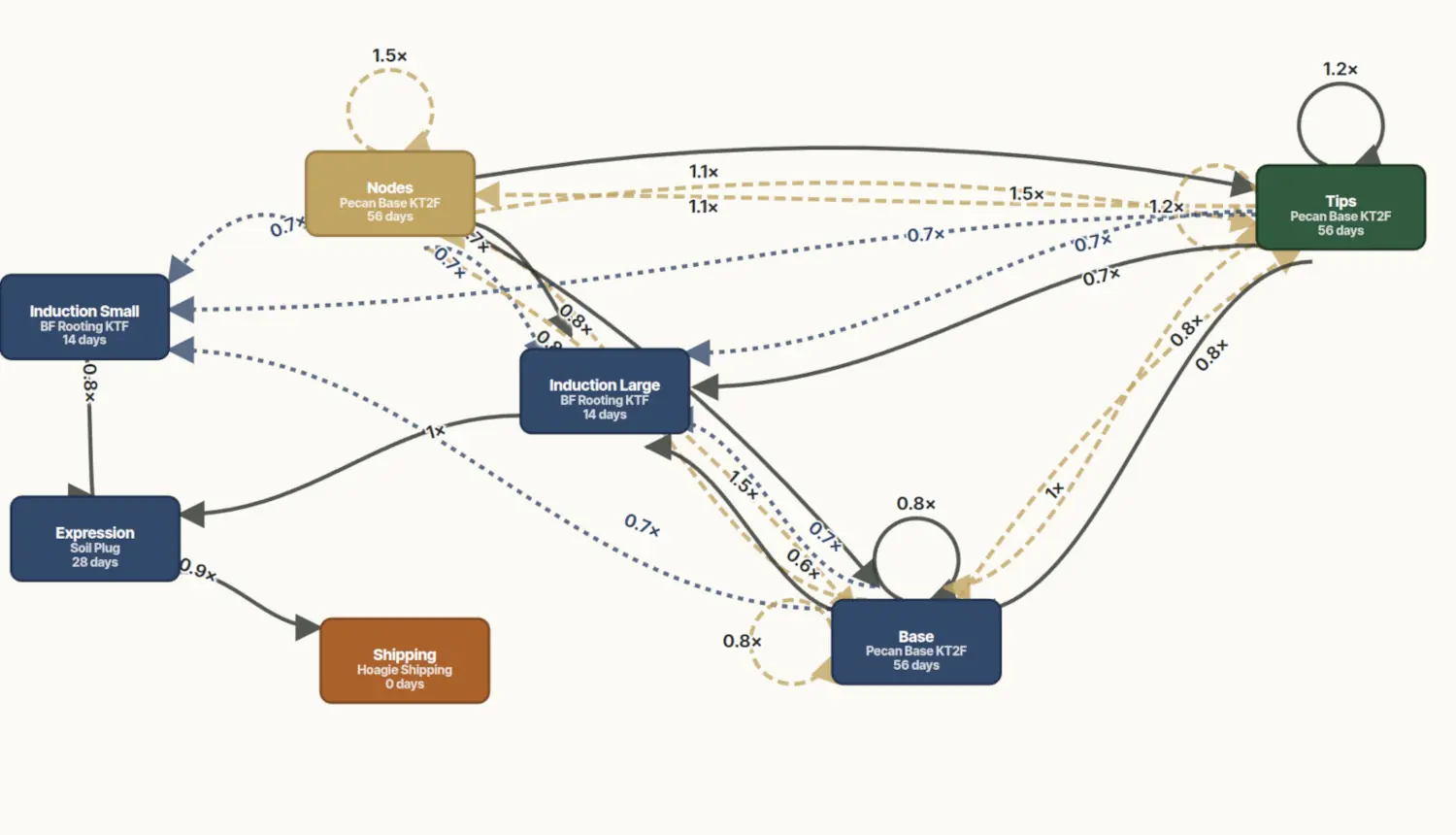
Each node is a stage in your operation. Each arrow is a possible routing — Standard, Excess, or Insufficient — for material moving between stages.
Every routing carries a multiplication rate (1.5×, 0.8×, etc.). Click any edge to edit it. The platform uses these to compute how much material every stage produces for every downstream stage.
Each stage carries its real settings: container, days at stage, and the plant line growing in it. Numbers come from your historical data, not industry averages.
01
02
03
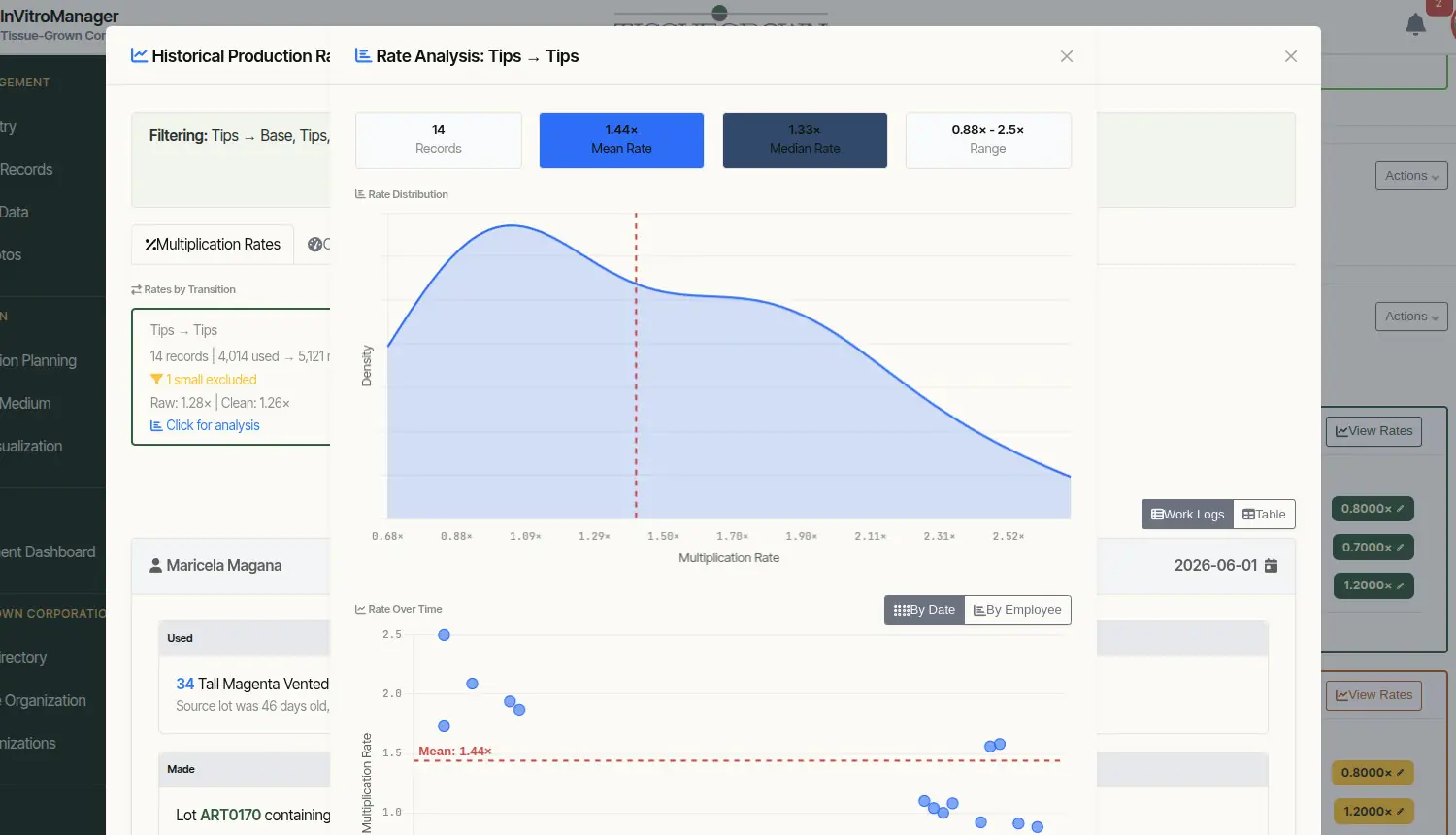
Every routing path — Tips → Tips, Tips → Base, Standard, Excess, Insufficient — gets its own multiplication rate, computed from actual work events on your bench. Here: 14 records, raw 1.28×, cleaned to 1.26× after excluding sparse samples.
Mean, median, range, and observation count surface together. Confirm which summary statistic the planner should use — and see how confident you are in the number before you commit it to the model.
Each blue dot is a real work event from your records. The dashed line is the mean; the scatter shows how reliable that number is. Outliers stand out, and trends over time appear — so you know when a rate is drifting.
01
02
03
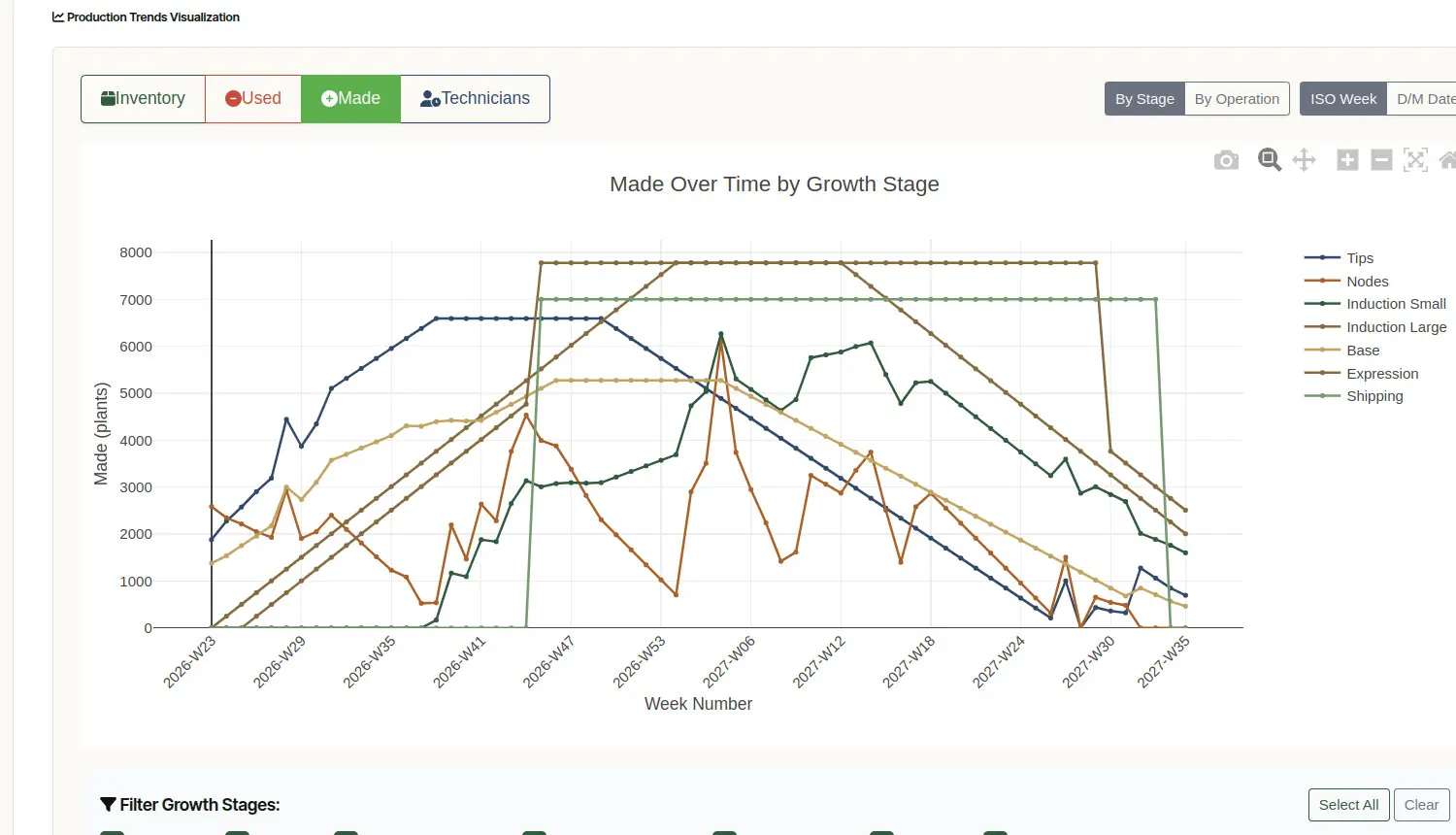
Production by growth stage, projected week by week from your commitments. Each line is a stage; the slope shows how fast material moves through your operation to meet its delivery dates.
Your delivery commitments shape the shipping line at the top. When the plateau is steady, the dates you've promised are getting met. When it sags, something's at risk.
Inventory, Used, Made, Technicians — flip between views to see the same plan as material on the bench, material consumed, material produced, or labor required.
01
02
03
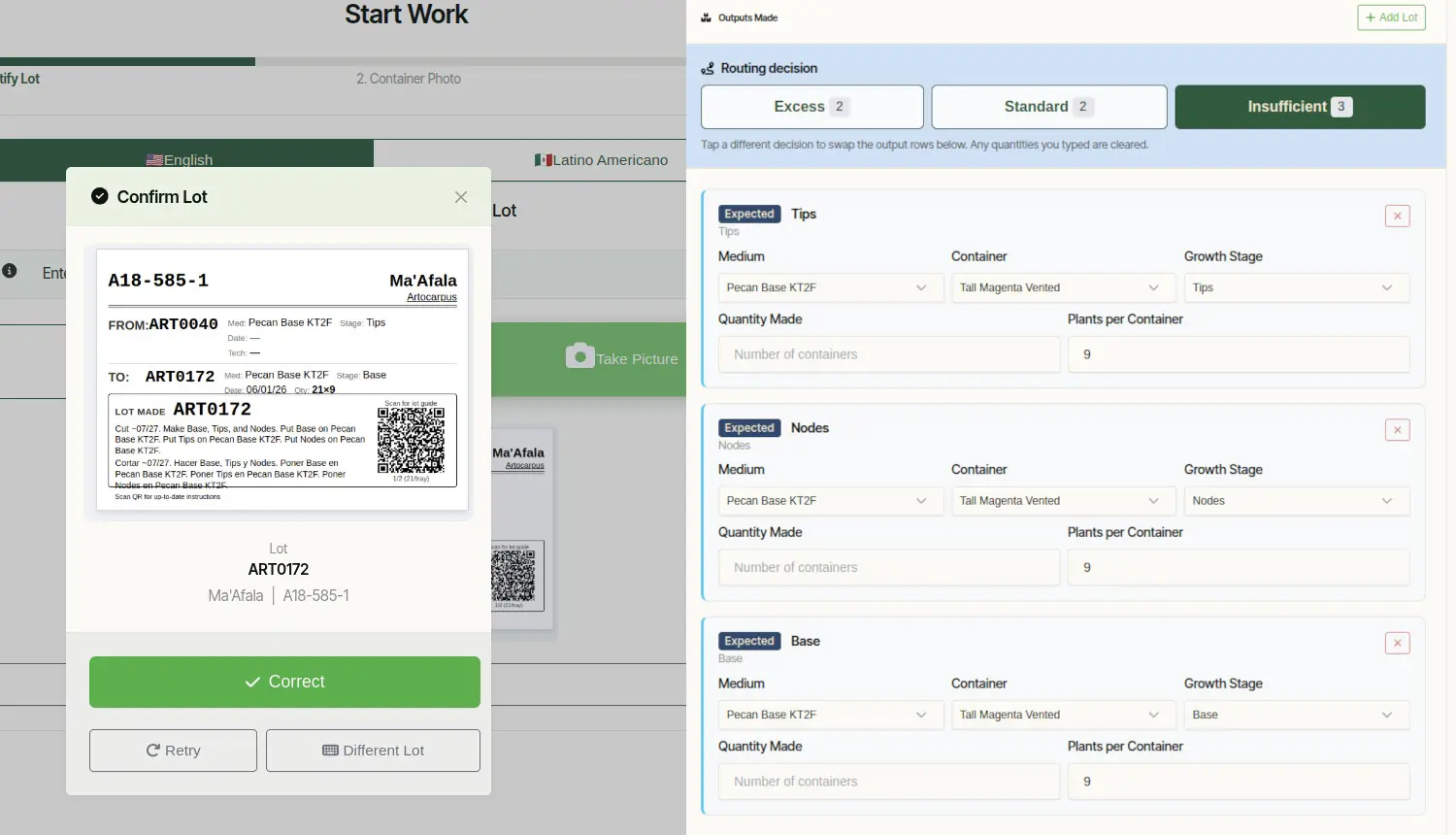
Each lot's card shows exactly what to do next — cut what, make what, put it on what medium, route it to what stage. The production plan becomes the work order, lot by lot, in English and Spanish.
The planner's routing decision is pre-selected (Standard, Excess, or Insufficient). Reality on the bench wins — tap to switch, and the output rows below swap to match.
The system already knows what should be produced at this stage — Tips, Nodes, Base — with the right medium and container. The tech enters quantities; the structure is the assignment.
01
02
03
04
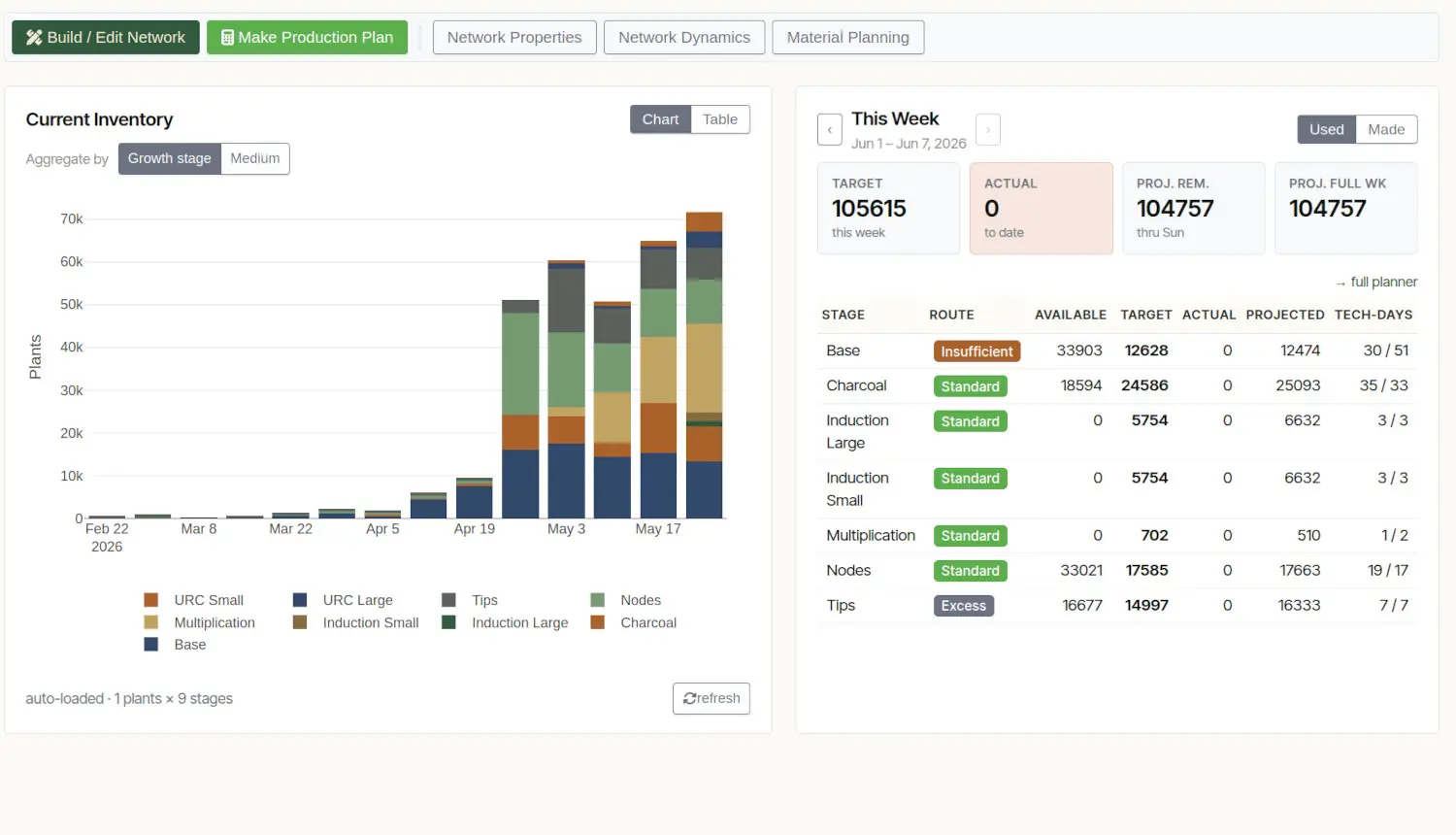
What's on the bench, week by week, in plants — not containers. Each color is a different growth stage. The slope tells you whether the operation is building up, holding, or drawing down at every stage simultaneously.
Target derived from your delivery dates. Actual updates from real work logs. Projected Remaining and Full Week show what the planner expects given current pace — so you know mid-week whether the week will land.
Each stage carries its routing — Standard, Excess, or Insufficient — set by the planner against current inventory. The bench knows whether to follow plan or compensate for over- or under-production upstream.
Tech-days needed for the week (left number) vs. tech-days available (right). Mismatch is visible Monday morning — before the bench notices a shortfall, you can shift work, add hours, or adjust targets.
Your subscription includes the production engineers and analysts who build the model with your team, calibrate the production planner to your actual rates, configure the auto-assignment tool to your staffing patterns, and stay on call as your operation changes. Production planning isn't software you install — it's a working system you operate with us.
Talk to us about the week you've been trying to plan accurately.
We start with a 30‑minute conversation about your operation. If we're a fit, we visit; if we're not, we'll point you to someone who is.